Event management

Seat Chart App
Free drag-and-drop seating chart maker for weddings, classrooms, events, and restaurants
Free browser-based seating chart maker. Drag tables onto a canvas, assign guest names, and export printable PDFs in minutes.
About Seat Chart App
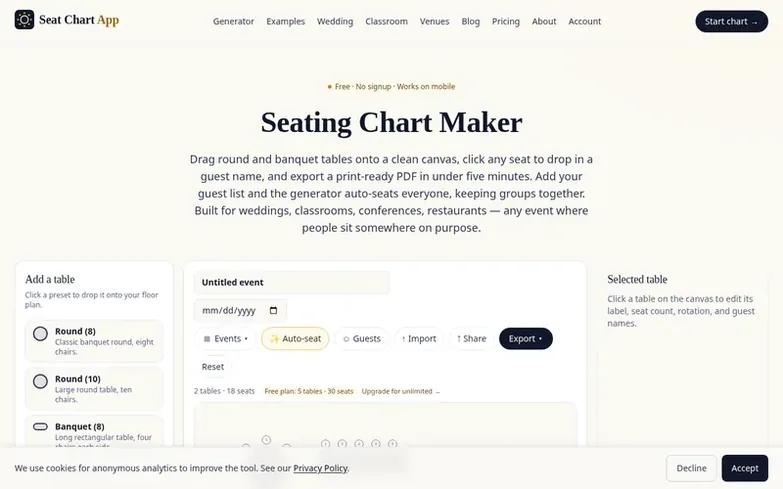
Seat Chart App is a dedicated seating chart tool built for real events. Users drag tables (round, rectangular, or head tables) onto a canvas, click seats to assign guest names, and export printable PDFs with guest lists grouped by table. The tool understands tables and seats as objects, so it automatically updates seat counts and guest assignments without requiring manual shape adjustments.
The free plan covers one event with up to five tables and thirty seats, including watermarked PDF export and browser-based storage. The $9 one-time Event pass unlocks unlimited tables and watermark-free PDFs for 180 days. Pro ($19/month) adds unlimited events, layout fixtures, shareable links, and CSV import/export. The tool works on mobile and desktop, with no account required.
What we found
- Drag-and-drop table placement with round, rectangular, and head table presets
- Guest name assignment by clicking seats
- Automatic guest seating based on guest list
- Table duplication for quick layout replication
- PDF export with guest list grouped by table
- Place cards, table numbers, and tent cards generated from one chart
- A–Z find-your-seat sign for event entrance
- Floor plan with customizable objects (stage, bar, dance floor)
- Local browser storage with no account required
- CSV guest list export and import
Pricing
Pricing model: Freemium
Free: one event with up to 5 tables and 30 seats, watermarked PDF export. Event pass: $9 one-time for unlimited tables and seats, watermark-free PDF, valid for 180 days. Pro: $19/month (or $59/year, save 74%) for unlimited events, all year. Business: $29/month (or $290/year, save 2 months free) for
Common questions
- Is this seating chart maker really free?
- Yes. The free plan covers one event with up to five tables and thirty seats, including drag-and-drop layout, guest-name assignment, and watermarked PDF export. This is enough for most small weddings, baby showers, conference panels, and classrooms. Pro is only needed for unlimited tables, multiple events, or watermark-free PDFs.
- How long does it take to build a seating chart?
- Five minutes for a typical wedding with 15 round tables and 120 guests, once you have the guest list ready. The drag-and-drop workflow is designed to feel fast: drop a table preset, drag it where you want it, click a seat, type the name, and repeat. Table duplication cuts time in half for classroom and theater rows.
- Can I export a PDF and print it?
- Yes, every plan includes PDF export. The free PDF includes a small watermark and footer line. Pro removes the watermark, exports at print resolution, and includes a per-table guest list under the chart. Both versions print clean on US Letter and A4.
- Does Seat Chart App work on mobile?
- Yes. The canvas, table presets, and guest-assignment interface are all touch-friendly and tested on iPhone 12 and modern Android. For large 30-table weddings, a laptop is still recommended, but mobile is fully functional for review, edits, and showing the chart on-site.
- What is the difference between Seat Chart App and Canva?
- Canva is a general design tool where you draw seats as shapes. Seat Chart App understands tables and seats as objects, so seat counts, guest assignments, and printable guest lists update automatically. This saves about an hour of manual reshuffling for real events with guest names.
Leave a review for Seat Chart App
We found no reviews of Seat Chart App yet. Add the first. Reviews here are free and can't be bought by anyone.
Seat Chart App has a free listing. The owner can unlock the full profile with a paid launch for $5:
- Founder story (locked)
- Milestones (locked)
- Demo video (locked)
- Dofollow website link (locked)
 Shneaky Santa
 Gleeday
 Quick Secret Santa
 Proximatic